

模板:Multiple image/doc

 | 此页面是Template:Multiple image的模板文档。 此页面可能包含了模板的使用说明、分类和其他内容。 |
 “Template:MI”重定向至此。它不应与Template:Mi相混淆。
 | 此模板文档被引用于4,100+个页面。 为了避免造成大规模的影响,所有对此模板文档的编辑应先于沙盒、测试样例或您的沙盒上测试。 测试后无误的版本可以一次性地加入此模板文档中,但是修改前请务必于讨论页发起讨论。 模板引用数量会自动更新。 |
 | 本模板使用 Lua 语言: |
 | 本模板使用以下模板样式: |
此本模板使用后能生成一个包含垂直或水平排列多个图像的框。
语法
[编辑源代码]{{multiple image|caption_align=center|header_align=center
<!-- Essential parameters -->
| align = <!-- right (default), left, center, none -->
| direction = <!-- horizontal (default), vertical -->
| background color = <!-- box background -->
<!-- Header -->
| header_background =
| header_align = <!-- center (default), left, right -->
| header =
<!-- Images -->
| width = <!-- image width in pixels (an integer, omit "px" suffix); overrides "width[n]"s below -->
<!--image 1-->
| image1 = <!-- filename only, i.e. without "File:" or "Image:" prefix -->
| width1 =
| alt1 =
| link1 =
| caption1 =
<!--image 2-->
| image2 = <!-- filename only, i.e. without "File:" or "Image:" prefix -->
| width2 =
| alt2 =
| link2 =
| caption2 =
<!-- and so on, to a maximum of 10 images (image10) -->
<!-- Footer -->
| footer_background =
| footer_align = <!-- left (default), center, right -->
| footer =
}}
范例
[编辑源代码]

Players are cautioned with a yellow card and sent off with a red card.
{{multiple image
 | width = 60
 | image1 = Yellow card.svg
 | alt1 = 黃色橢圓形邊緣
 | image2 = Red card.svg
 | alt2 = 紅色橢圓形邊緣
 | footer = Players are cautioned with a yellow card and sent off with a red card.
}}


{{multiple image
 | align = left
 | direction = vertical
 | width = 200
 | header = [[Portable Network Graphics|PNG]] 透明度示範
 | image1 = PNG transparency demonstration 1.png
 | alt1 = 彩色骰子加白色背景
 | caption1 = 具有8位透明度圖層的PNG圖像...
 | image2 = PNG transparency demonstration 2.png
 | alt2 = 彩色骰子加方格背景
 | caption2 = ...這裡覆蓋一個方格的背景。
}}
使用background color
[编辑源代码]


Adoxa(五福花)
{{multiple image
 | background color = #BBDD99
 | width = 160
 | image1 = Adoxa_moschatellina_210406.jpg
 | alt1 = 綠草與一些小黃白色的花
 | image2 = Adoxa_moschatellina_210406a.jpg
 | alt2 = 在綠色葉子背景前的三朵小白色和黃色的花
 | image3 = adoxa_moschatellina_blatt.jpeg
 | alt3 = 一棵植物的葉,每組有三個,每個有三塊葉
 | footer_background = #BBDD99
 | footer_align = center
 | footer = Adoxa([[五福花]])
}}
使用连结 (link[n])
[编辑源代码]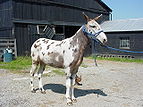
A mule
(骡子 luózi)
(骡子 luózi)
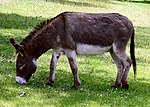
A donkey
(驴子 lǘzi)
(驴子 lǘzi)

A fish
(鱼 yú)
(鱼 yú)
The image of the mule links to Mule; the image of the donkey does not link anywhere; the image of the trout links to a standard image description page.
{{multiple image
 | align = left

 | image1 = Frecklesmule.jpg
 | width1 = 143
 | alt1 = A mule
 | link1 = Mule
 | caption1 = A mule<br />(骡子 ''luózi'')

 | image2 = Donkey 1 arp 750px.jpg
 | width2 = 150
 | alt2 = A donkey
 | link2 =
 | caption2  = A donkey<br />(驴子 ''lǘzi'')</center>

 | image3 = Rainbow_trout.png
 | width3 = 91
 | alt3 = A trout
 | caption3  = A fish<br />({{lang|zh|2=鱼}} ''yú'')</center>

 | footer = The image of the mule links to [[Mule]]; the image of the donkey does not link anywhere; the image of the trout links to a [[Image description page|standard image description page]].
}}
多行
[编辑源代码]To create an array of images, with multiple rows, use |perrow=. The value passed to |perrow= may be a single number, or a list of numbers delimited by /. This feature may also be combined with |total_width= for multiple rows of images with the same total width.


Surveying Equipment. Clockwise from upper left: Optical Theodolite, Robotic total station, Optical level, RTK GPS Base station.
{{multiple image|perrow = 2|total_width=300
| image1 = Kern_Theodolit_DKM2-A.jpg  |width1=319|height1=425
| image2 = Total-Robotic-Station.jpg  |width2=1728|height2=3072
| image3 = DumpyLevel.jpg  |width3=1600|height3=1200
| image4 = GPS_Survey_Equipment_at_Weir_Dyke_Bridge_-_geograph.org.uk_-_336908.jpg|width4=427|height4=640
| footer = Surveying Equipment. Clockwise from upper left: Optical Theodolite, Robotic total station, Optical level, [[Real-time kinematic | RTK]] GPS Base station.
}}
参见
[编辑源代码]- {{Gallery}}
- {{Image array}}
- {{Image frame}}
- {{Photomontage}}